
When Your OBD2 Scanner Isn’t Enough: Diagnosing Problems on Class 6–8 Trucks
You pull a fault code on a truck and your scan tool gives you nothing. Or worse — it gives you a generic P-code that doesn’t match anything the driver is describing. If you’ve spent most of your career diagnosing passenger cars and light trucks, you’ve probably run into this the moment a commercial rig rolls into your bay.
The problem isn’t your scanner. The problem is the protocol. Class 6 through Class 8 commercial trucks — think medium-duty box trucks up through full Class 8 semi-tractors — communicate using a completely different diagnostic framework than the OBD2 system you’re used to. The rules change, the connectors change, the codes change, and the tools you need change with them.
Here’s what every mechanic should know before hooking up to a heavy-duty rig for the first time.
OBD2 and J1939 Are Not the Same Thing
OBD2 (On-Board Diagnostics II) became mandatory on all light-duty vehicles sold in the U.S. in 1996. It uses a standardized 16-pin DLC connector, a common set of parameter IDs (PIDs), and generic diagnostic trouble codes (DTCs) that any compliant scan tool can read.
Commercial trucks don’t play by those rules. Most Class 6–8 vehicles use SAE J1939, a Controller Area Network (CAN) protocol designed specifically for heavy-duty applications. Instead of PIDs, J1939 uses Suspect Parameter Numbers (SPNs) and Failure Mode Identifiers (FMIs). Instead of a P0xxx or P1xxx code, you get something like SPN 100 FMI 1 — which tells you the specific parameter (engine oil pressure) and the type of failure (data valid but below normal range).
Some older trucks, particularly pre-2000 models, may use J1587/J1708 instead of J1939 — an even older serial communication protocol that requires adapters most shops don’t have on hand.
That 9-Pin Connector Under the Dash
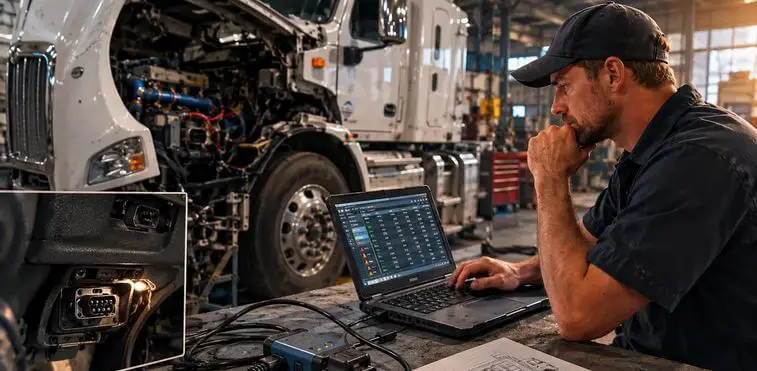
If you walk up to a commercial truck expecting a 16-pin DLC, you won’t find one — at least not the kind you’re used to. Most Class 6–8 trucks use a 6-pin or 9-pin Deutsch connector, typically located under the dash or on the firewall. This is the diagnostic port for the J1939 data bus.
There are also 9-pin connectors used for trailer communication (the J560 connector on the back of a tractor handles trailer lights and braking, but that’s separate from diagnostics). Don’t confuse them.
Some manufacturers — particularly European brands that have entered the North American market — may use additional proprietary ports or connectors alongside the standard 9-pin. Knowing which connector you’re dealing with before you grab a cable saves a lot of frustration.
Reading SPN/FMI Codes vs. Standard DTCs
Once you’re connected to the right port with a J1939-capable tool, fault codes will look different than what you’re used to. Here’s a quick breakdown of how SPN/FMI codes work:
- SPN (Suspect Parameter Number): Identifies the specific circuit, component, or system. For example, SPN 110 refers to engine coolant temperature.
- FMI (Failure Mode Identifier): Describes the type of failure. FMI 3 means voltage above normal. FMI 4 means voltage below normal. FMI 2 means data erratic. There are 31 FMI values in the J1939 standard.
- Occurrence Count: Many systems also log how many times a fault has occurred, which is useful for chasing intermittent issues.
The combination of SPN + FMI tells you exactly what failed and how. It’s a cleaner system than generic OBD2 codes in some ways — once you know the reference table. A good heavy-duty diesel fault code lookup resource is worth bookmarking; commercial truck codes are too manufacturer-specific to memorize.
Why Your OBD2 Scanner Won’t Cut It
Most consumer-grade and general automotive scan tools simply cannot communicate over J1939. They’re built to speak OBD2, and even the better ones that claim “truck support” may only cover light-duty emissions systems, not the full J1939 data bus on a Kenworth or International.
Even if your tool can physically connect to the 9-pin port with an adapter, it may not be able to request the correct SPNs, interpret FMIs accurately, or access proprietary modules like the transmission control unit, ABS controller, or aftertreatment system. You’ll either get no data or incomplete data — and incomplete data in commercial truck diagnostics can send you chasing the wrong problem.
Tools That Actually Work on Heavy-Duty Trucks
Getting properly equipped for commercial truck diagnostics doesn’t have to mean spending six figures on OEM software for every manufacturer. Here are the practical options:
- Nexiq USB-Link 2 or 3: The industry-standard J1939 interface. Works with most professional diagnostic software packages.
- Noregon DLA+ 2.0 Adapter: Another widely used interface, particularly popular with independent shops running JPRO Fleet Diagnostics software.
- JPRO Professional: One of the best all-makes diagnostic platforms for independent shops. Covers Cummins, Detroit, PACCAR, International/Navistar, Mack, and Volvo engines plus transmission and ABS systems.
- OEM Factory Software: Cummins INSITE, Detroit Diagnostic Link (DDL), Allison DOC, and similar OEM tools give you the deepest access to their respective systems — but require subscriptions and dedicated hardware.
- Jaltest or Autel HD: Mid-market all-makes options that cover more ground than a basic OBD2 scanner without the full investment of JPRO or OEM software.
The right choice depends on how much heavy-duty work flows through your shop. If you see a commercial truck once a month, a rental or a referral relationship with a dedicated HD shop may make more sense than a full software subscription.
Aftertreatment Systems Add Another Layer
Since 2007, on-highway diesel engines sold in the U.S. have been required to run diesel particulate filters (DPF) and, since 2010, selective catalytic reduction (SCR) systems using diesel exhaust fluid (DEF). These aftertreatment systems generate their own fault codes and require their own service procedures.
DPF regeneration issues, DEF quality faults, NOx sensor failures, and dosing injector problems are among the most common complaints on modern commercial trucks — and all of them require a J1939-capable tool to diagnose accurately. Trying to clear an aftertreatment fault with a light-duty scanner isn’t just ineffective, it can mask the real problem long enough to cause serious — and expensive — damage to downstream components.
Making the Jump to Heavy-Duty Work
Commercial truck diagnostics has a learning curve, but it’s not an insurmountable one for a mechanic who already understands diesel fundamentals. The core skills transfer — you’re still reading sensor data, analyzing circuit behavior, and thinking systematically about how systems interact. The language and tools are just different.
If you work primarily on gasoline vehicles or light trucks and you want to expand into heavy-duty diesel, start with a solid understanding of J1939 fundamentals before you invest in tooling. Then choose a diagnostic platform that gives you broad coverage across the manufacturers you’re likely to see in your market. For ongoing resources, technical service information, and diesel fleet maintenance tips for owner-operators and fleet managers who want to understand what’s happening to their trucks, Heavy Duty Journal (heavydutyjournal.com) is worth adding to your reading list.
The commercial truck market isn’t going anywhere. If your shop can handle the diagnostics, the work will come.